

Take an alert to a closed case without leaving Tazama. Connect a new data feed without writing code. Test a rule against past transactions before it goes live. See which rules catch fraud and which waste your investigators’ time.
Get startedWatch it running
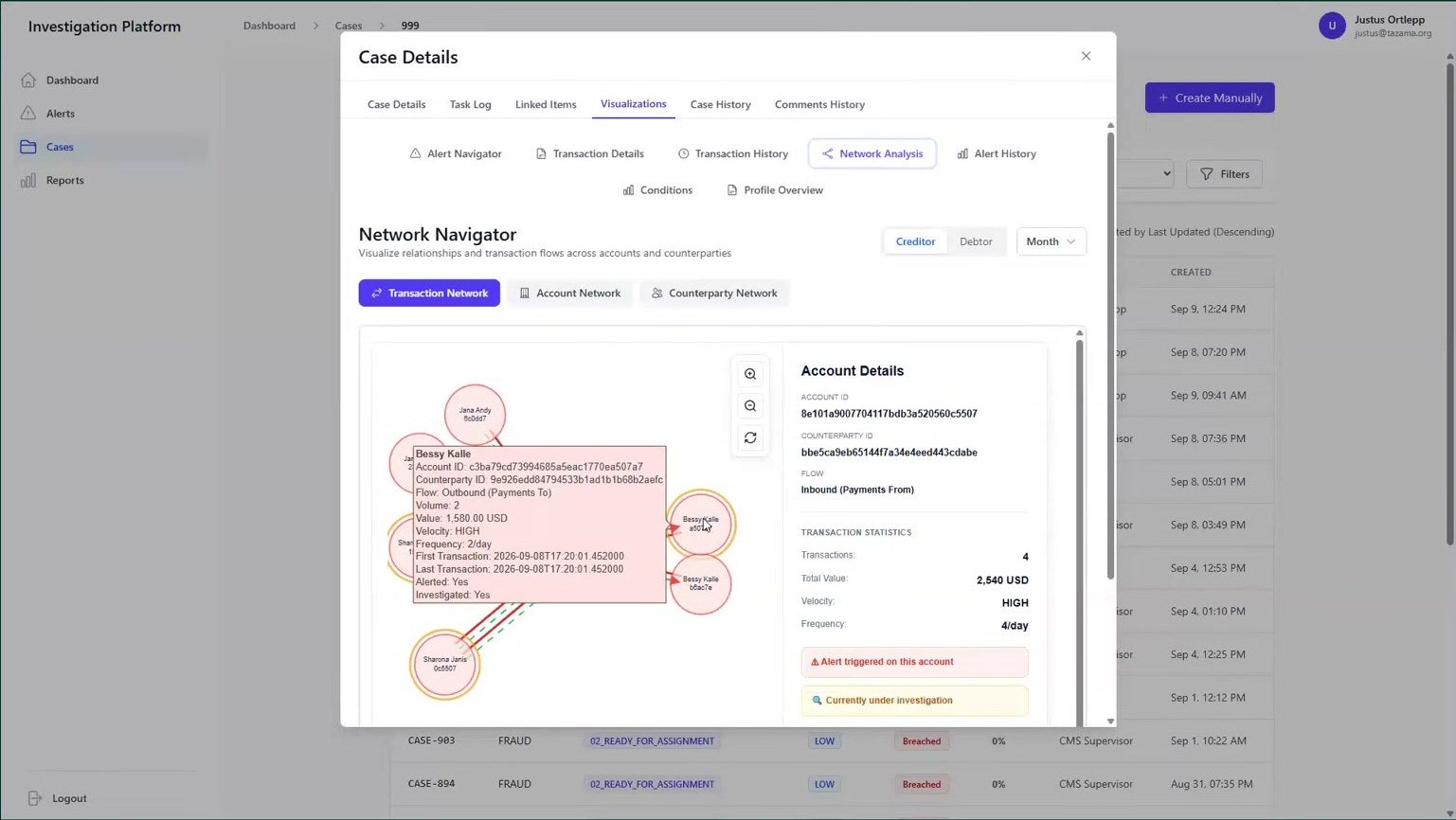
Case management: every alert lands in a queue, gets a case, and closes with an audit trail.
Version 4.0.0
Released 23 July 2026. Release notes
Four new products
Case Management, Connection Studio, Rule Studio, BIAR
Eight institutions live
Running Tazama in production
Apache 2.0
No license fee, no vendor lock-in. Source
Four new products
What’s new in Tazama 4.0.0
Tazama 4.0.0 adds the four things every fraud operation needs around detection: a case system for investigators, a way to connect new data without code, a place to build and test rules, and analytics that show whether detection is working.
Case Management
Investigators work every alert in one place: triage, assign, investigate, file, close. Supervisors see who has what and what’s overdue.
Connection Studio
Connect a new data source by mapping fields on screen, and test the mapping on a sample before it goes live.
Rule Studio
Build a rule on a canvas, replay past transactions through it, and put it through review before it touches live traffic.
Analytics and reporting
Find out which typologies fire, which catch real fraud, and where thresholds should sit. Six dashboards for reporting.
Case Management
Alerts from start to finish, in one place
Now you can work every alert to a close from one place. Each one arrives in a queue with a score and a reason. Your team triages it, and every decision is recorded.
Investigators get the account, counterparty and transaction networks behind the alert inside the case, so they stop switching tools to build a picture. Supervisors see caseloads, deadlines and what’s overdue on one screen.
- Roles for administrators, supervisors, investigators and compliance officers
- An SLA clock on every case from the moment it is ready to work
- A filed SAR or STR attached to the case as evidence, by the compliance officer
- Any report exported to CSV, Excel or PDF
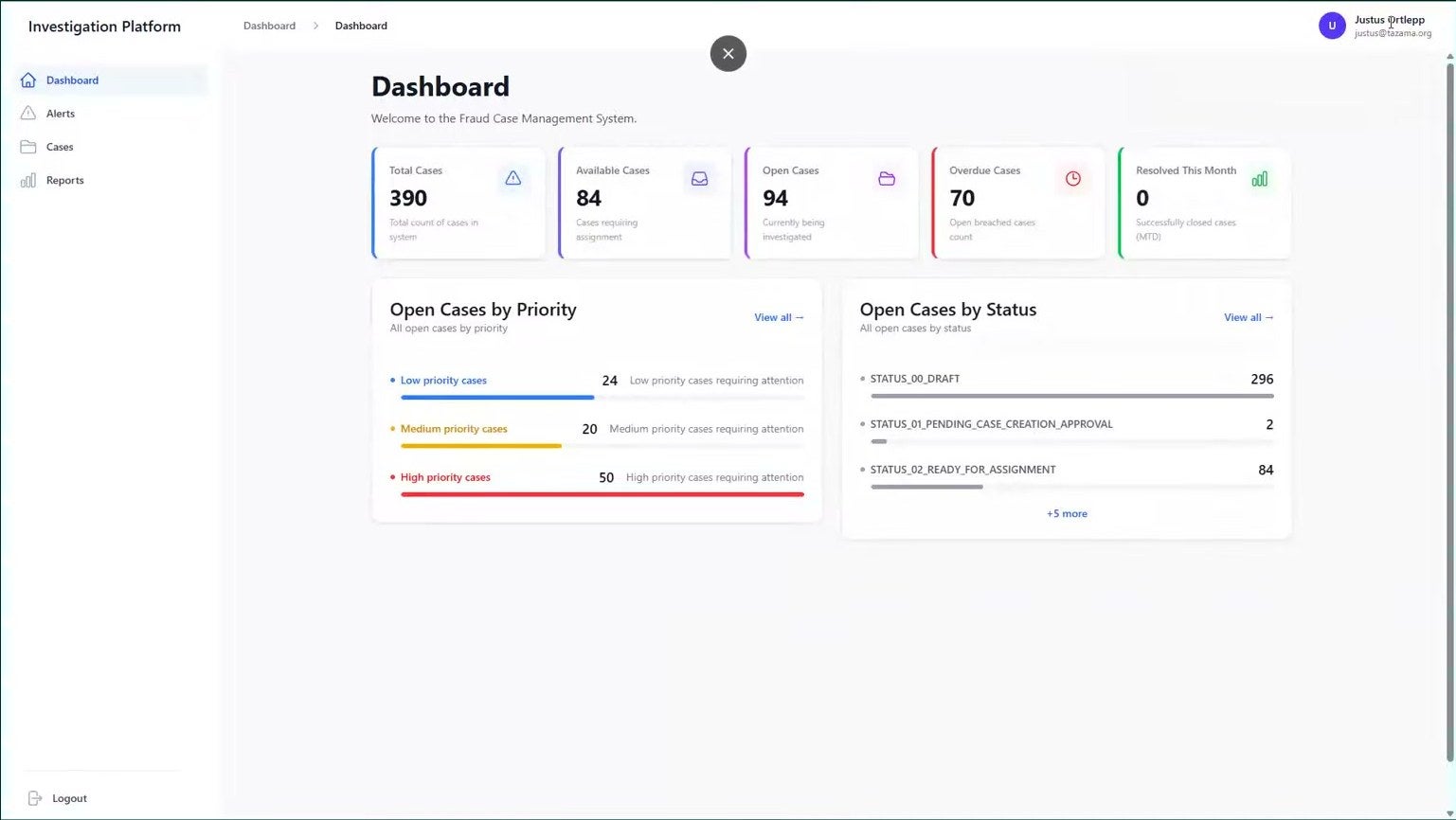
The supervisor’s dashboard: total, available, open and overdue cases at a glance, then open cases by priority and by status, so a team lead sees where the backlog sits before an SLA runs out.
Connection Studio
Connect a new data feed without a developer
Tazama accepts ISO 20022 payment messages as standard. For anything else, such as mobile money, disbursements, insurance claims or agent transactions, an analyst maps the fields on screen, tests the mapping on a sample payload, and sends it for approval.
Once the feed is live, every payload is checked against your schema and runs through the same detection pipeline as a payment, with the rules and typologies you assign to it.
- Map fields directly, split or join them, set a constant, or apply a function
- Pull files over SFTP on a schedule, with credentials encrypted
- Approval before any mapping goes live, with an audit log
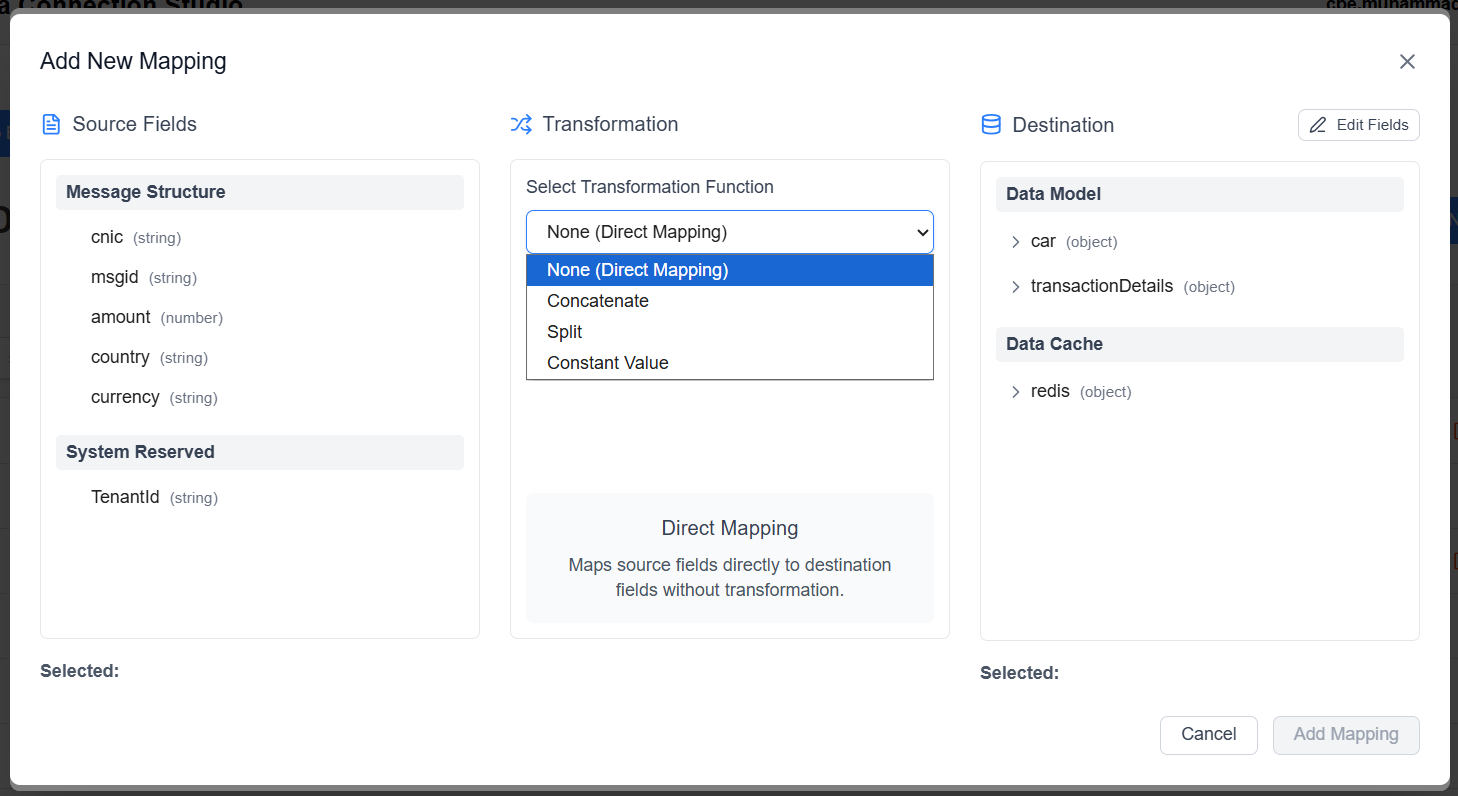
Mapping a new feed: pick a source field, choose how it transforms (direct, concatenate, split or a constant value) and point it at the destination model. No code is written.
Rule Studio
Test a rule against past transactions before it goes live
Your analysts build rules on a canvas and Tazama generates the code. They can clone a rule, version it and write test cases on the same screen, without waiting on an engineer.
Before a rule goes live, run it against a masked copy of your past transactions, on its own or through the full pipeline, and see what it would have flagged. Then it goes to review. Building, approving and deploying a rule are separate permissions, so the person who writes a rule need not be the one who approves it. That gives your auditors a clean trail of who changed what, and when.
- Drag-and-drop canvas, generated TypeScript
- Rule-only or end-to-end simulation
- Maker, checker and deployer roles
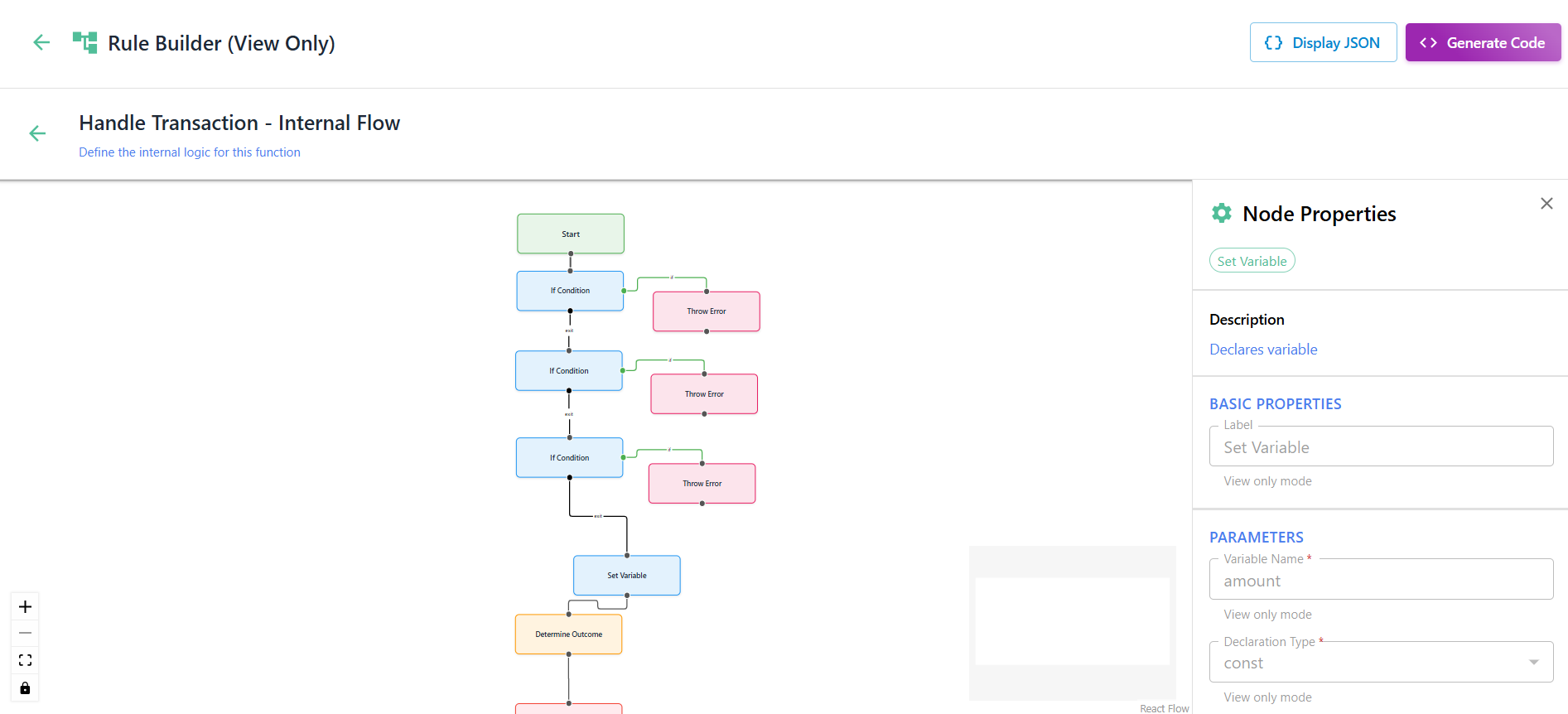
A rule on the canvas: conditions and outcomes as connected nodes, with each node’s properties alongside. Tazama generates the TypeScript from what your analyst draws.
Business Intelligence, Analytics and Reporting (BIAR)
See which rules catch fraud and which waste time
BIAR collects the detection stream and the case outcomes into one lakehouse, so you can answer the questions a fraud team gets asked: which typologies fire most, which lead to confirmed fraud, and how many alerts turn out to be false positives.
The calibration notebook trains a model on your own history and suggests where thresholds should sit. Six dashboards cover reporting: executive overview, fraud trends, typology effectiveness, case trends, case tracking and transaction monitoring performance. Inside a case, investigators see the network and alert-history views drawn from the lakehouse, without opening a separate tool.
- JupyterHub with a workspace for each analyst
- Notebooks for data discovery, rule discovery, anomaly detection and calibration
- Medallion lakehouse on Apache Hudi, fed by NiFi and Spark
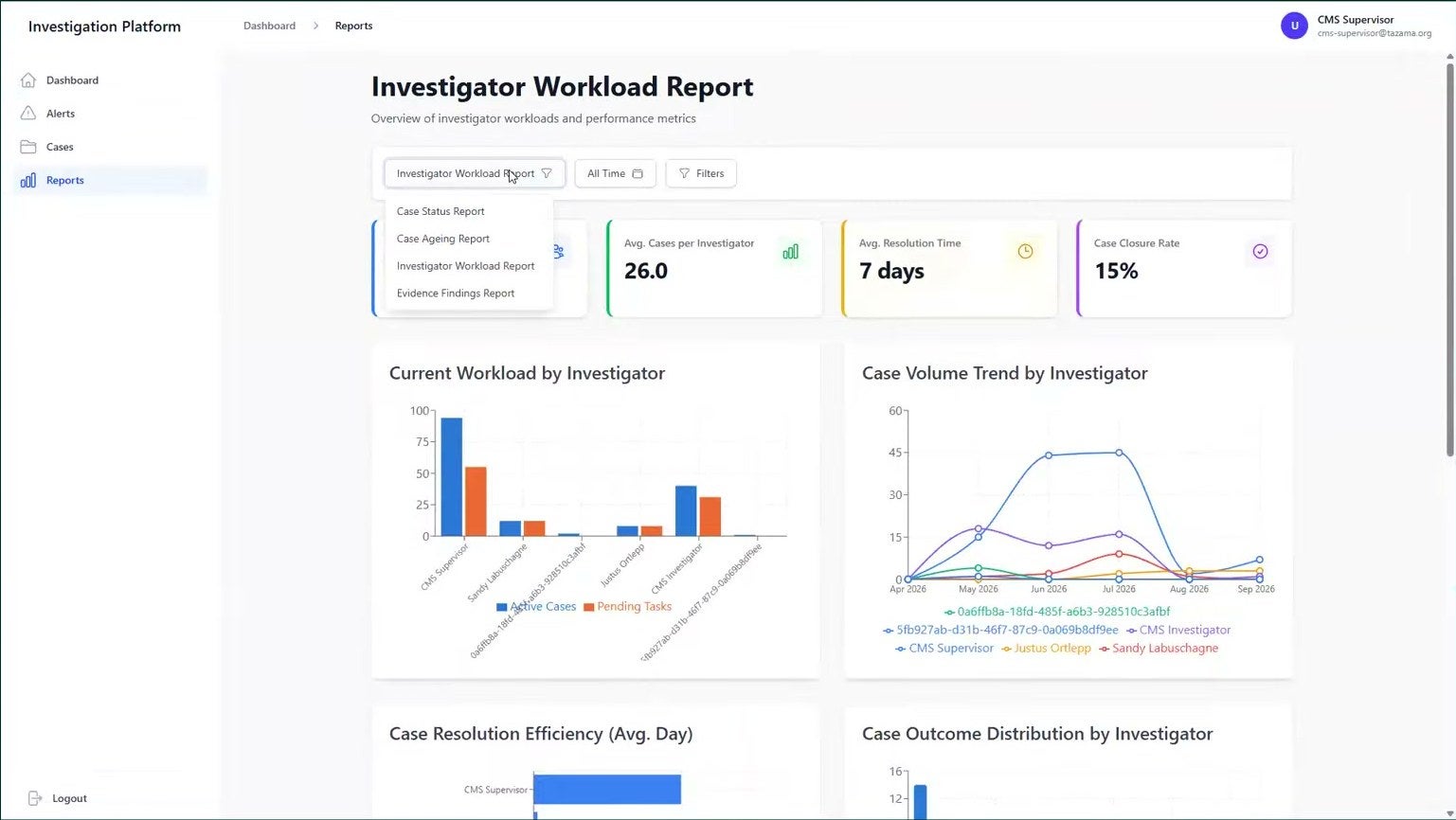
The investigator workload report inside the case system: cases per investigator, average resolution time and closure rate.
Tazama Core
Change your rules during business hours
Tune detection while transactions keep flowing, bring new feeds through the same pipeline, and run the rules Tazama ships alongside your own.
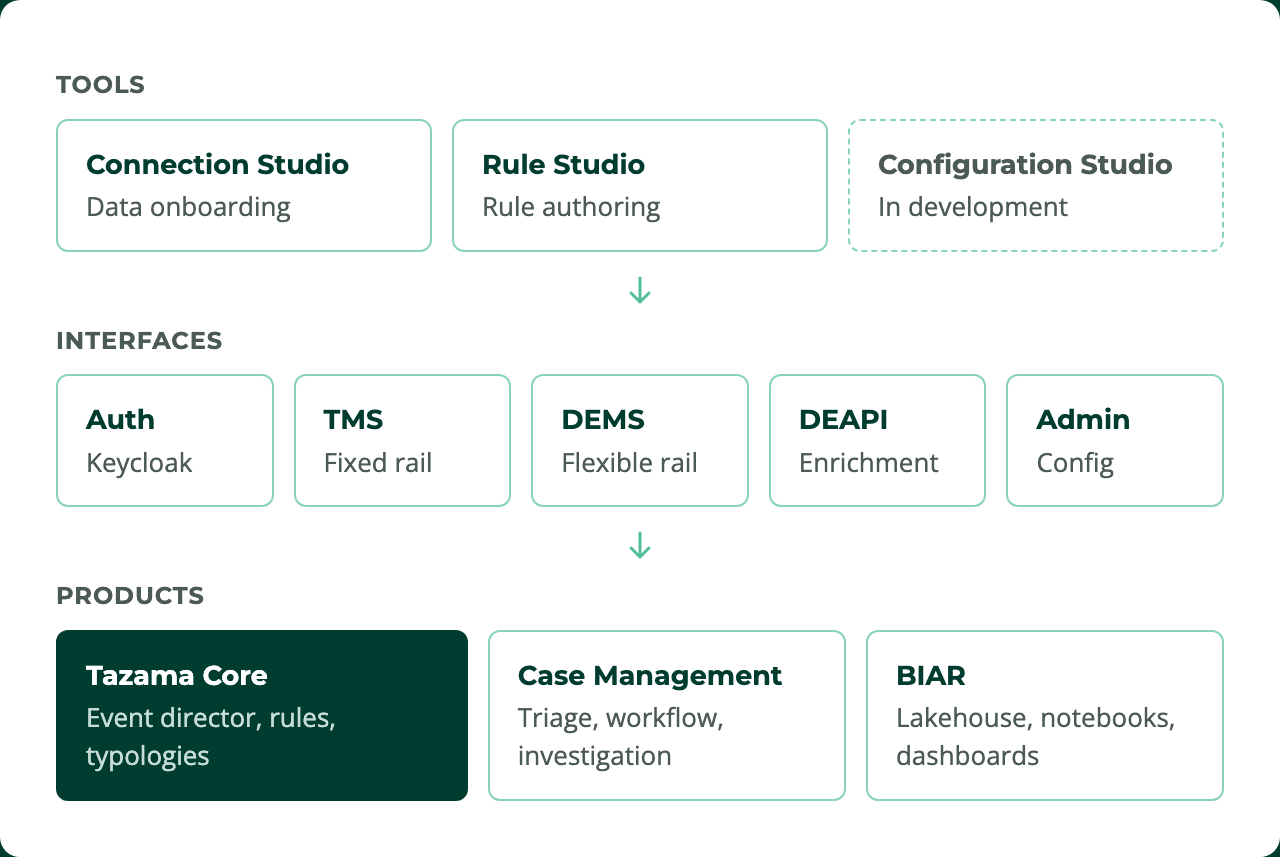
One pipeline for payments and everything else
ISO 20022 messages come in on a rail built for speed, now covering payment initiation as well as clearing. Anything you define in Connection Studio comes in on a second rail. Both go through the same event director, rules and typology scoring, so a mobile-money feed gets the same detection as a card payment.
Tazama ships 33 ready-built rule processors, and you add your own from Rule Studio. Typologies weight the results against thresholds you set. The calibration notebook trains on your own history and hands back an updated typology configuration to load, with no code change.
No maintenance window
Push a new rule or typology configuration and it takes effect while traffic is flowing. Each service picks up the change in turn, downstream first, and keeps its existing subscriptions open while it does, so traffic keeps flowing. Each rule processor also checks at startup that the rule it loaded is the one it was configured to run, so you can show an auditor what was running and when.
Get started
Up and running in an afternoon
The Docker Compose stack runs the whole platform on one machine so you can evaluate it. You need Docker, Git and a GitHub token with read:packages scope. Use a clean machine: the launcher removes any existing Tazama containers and volumes before it deploys.
# Clone the stack
git clone https://github.com/tazama-lf/tazama-stack -b main
cd tazama-stack

# Core: option 2 (Docker Hub), enable Authentication, apply
bash core/tazama-core.sh

# Extensions: option 2 (DEMS + DEAPI), then option 4 (studios + CMS)
bash extensions/tazama-extensions.sh

# Analytics: option 1
bash biar/tazama-biar.sh

# Check the TMS is up
curl http://localhost:5000
# {"status":"UP"}
The stack on main pulls release-candidate images by default. Set TAZAMA_VERSION=4.0.0 in each .env file to pin the release.
Core
PostgreSQL 18, NATS, Valkey, Keycloak, the TMS, admin service, event director, typology processor and the example rule processors. The full-service option pulls all 33.
Extensions
DEMS and DEAPI join the core. Connection Studio opens on port 5173, Rule Studio on 5174 and the case management system on 5175.
Analytics
NiFi, Ozone, Solr, Tika and JupyterHub, with the lakehouse API and the notebooks ready to open.
Production
Deploy on Kubernetes. Guides for on-premises, EKS, GKE and AKS are linked from the stack, and the community Slack has a working group for Kubernetes deployments if you want help.
Product overview, deployment guides, user manuals for the case system, both studios and the simulation module
What changed in 4.0.0, on GitHub
Answers to the questions people ask about 4.0.0
Ask anything, join a working group, request access to the rule processors
Before you evaluate
What you need to know before you commit
Is 4.0.0 generally available?
Yes. Version 4.0.0 was released on 23 July 2026, and it is the first release of the four new products. Fixes since then are landing ahead of the next release.
What does 'no license fee' leave out?
Hosting, implementation and support. The code is Apache 2.0 and free to run. You host it yourself or with a partner, and you provide or contract the people who run it. Implementation partners are listed on tazama.org.
Which message formats does it accept?
ISO 20022 clearing and payment initiation messages (pacs.008, pacs.002, pain.001, pain.013) on the fixed rail. Anything else, once defined in Connection Studio, on the flexible rail.
What is audited?
Configuration changes in both studios, every triage decision, case actions, priority changes and workflow transitions. Case audit events are held in OpenSearch, and both studios log configuration changes through a shared audit library.
What does SAR and STR filing cover?
A compliance officer uploads the filed suspicious activity or transaction report and any comments, and it stays with the case evidence. Regulatory reporting export templates, including goAML, are on the community backlog for anyone in the community to deliver.
Can one deployment serve several institutions?
Yes. Multi-tenancy has been in the core since 3.0 and in 4.0.0 it runs through batch processing, enrichment and configuration, with tenant-specific rules, typologies and thresholds.
Can we upgrade an existing 3.x deployment?
Not with the evaluation stack, which installs fresh. For a production 3.x deployment the path depends on what you run; a readiness note covering compatibility, backup and rollback is in preparation.
Where do we get help?
The community Slack for questions and working groups, GitHub issues per repository, the user manuals in the docs repository, and the implementation partners for delivery and support contracts.
Watch the walkthrough
See it running
A 90-minute walkthrough of 4.0.0, with a live demo of the case system, from Justus Ortlepp, Tazama’s Head of Product, and Soban Najam of Paysys Labs, an implementation partner.
Open the full walkthrough on YouTube (1h 31m)
Where Tazama is today
In production, and free to run
Tazama began as a Gates Foundation Level One Project principle: fraud detection for inclusive payment systems should be shared infrastructure, built once and open to every institution. It is hosted at the Linux Foundation, registered as a Digital Public Good, and costs nothing to license.
2015
Level One Project calls for shared investment in fraud detection
2022
Version 1 MVP, with more than 30 rules and typologies
2024
Linux Foundation launch in February. Digital Public Good in September
2025
First three institutions live in March. Version 3.0 in November
July 2026
Version 4.0.0
Today
Eight institutions live, more on the way